Sakana Marlinの調査依頼に、外部ファイルを添付できるようになりました。過去の調査や会議の議事録など、手元の資料を調査に活用できます。You can now attach external files to research requests in Sakana Marlin. Bring your own materials, such as past research and meeting minutes, into your research.
1. 手元の資料を、調査の出発点に1. Start with Your Own Materials
調査依頼の入力欄にファイルをドラッグ&ドロップし、資料をどう活用したいかを依頼文に添えてください。例えば、過去の調査の一部を深掘りしたり、議事録にある仮説を検証したりするよう依頼できます。Drag and drop files into the research request field, and describe how you would like to use them. For example, you can ask Sakana Marlin to explore a specific part of past research in more depth or test a hypothesis recorded in meeting minutes.
対応形式はPDF・CSV・TXT・MDです。最大5ファイルまで、1ファイルあたり30MBまで添付できます。Supported formats are PDF, CSV, TXT, and MD. You can attach up to 5 files, each up to 30 MB.
2. 添付ファイルの引用箇所を、レポート内で確認2. See Where Attached Files Are Cited
レポート内で添付ファイルを引用した箇所には、引用元が表示されます。PDFの場合は、参照したページ番号も表示されるため、元の資料と照らし合わせながら確認できます。Citations in the report show where attached files have been used and identify the source. For PDFs, they also include the page number, so you can cross-check the report against the original document.
3. 初期設定はOFF。利用時にONへ3. Off by Default. Enable It When Needed.
ファイル添付は、組織のセキュリティ方針に合わせて管理画面でON/OFFを切り替えられます。初期設定はOFFです。利用する場合は、組織のオーナーが管理画面の「ファイル添付を許可」をONにしてください。ONにすると、組織全体でファイル添付機能が利用できるようになります。File attachments can be turned on or off in Admin to match your organization’s security policies. They are off by default. To use them, an organization owner needs to turn on “Allow file attachments” in Admin. Once enabled, file attachments are available to everyone in the organization.
Sakana Marlinのホーム画面を刷新し、過去の調査を見つけやすく、整理しやすくしました。あわせて、Sakana Marlinとプランを作成せずに、入力した依頼からそのまま調査を始められるようになりました。We have redesigned the Sakana Marlin home screen to make past research easier to find and organize. You can also start research directly from your request, without first creating a plan with Sakana Marlin.
1. ホーム画面の刷新:過去の調査を、次の検討に活かす1. A New Home Screen: Find and Reuse Past Research
以前調べた市場を別の観点から見直すなど、過去の調査が新たな検討の手がかりになることがあります。必要なレポートをすぐに見つけ、再び活用できるよう、ホーム画面を改善しました。Past research can be a starting point for a new question, such as revisiting a market from a different angle. We have improved the home screen to make those reports easier to find and use again.
新しいホーム画面では、最近の調査や下書きを確認できます。調査一覧はリスト表示に加え、表紙のサムネイルが並ぶグリッド表示に対応しました。タイトルや表紙を手がかりに、見返したい調査を探せます。The new home screen shows recent research and drafts. Alongside the list view, a grid view displays reports with cover thumbnails, so you can find a report by its title or cover.
調査のタイトルも一覧から直接変更できます。レポートを開き直さずに、内容や用途が伝わる名前に整理できるため、後から見つけやすくなります。You can also rename research directly from the list, without reopening the report. A title that reflects its content or purpose makes it easier to find later.
2. 調査の始め方:プランに沿って深めるか、広く探索するか2. Starting Research: Follow a Plan or Leave Room to Explore
調査を始めるとき、確かめたい論点が決まっている場合もあれば、何を調べるべきかも含めて広く探索したい場合もあります。目的に応じて、プランを練ってから始めるか、そのまま調査を依頼するかを選べます。Sometimes you know exactly which questions you want to answer. At other times, you want to explore more broadly, including what is worth investigating. You can choose to develop a plan first or start the research directly.
テーマや背景・目的を入力し、「次へ」をクリックすると、依頼内容の確認画面に進みます。「調査を開始」を選ぶと、そのままリサーチが始まります。先に範囲や論点を具体化したい場合は、「Sakana Marlinとプランを作成」を選び、対話を通じて方針を練ることができます。Enter your topic, background, and objectives, then click Next to review your request. You can start the research from there. If you want to define the scope and questions first, choose to create a plan with Sakana Marlin and discuss the direction together.
プランを作成すると、調査結果はそのプランに沿って出力されます。特定の論点を深掘りしたい場合に向いている一方、プランに含めていない論点やアイデアは結果に出づらくなります。When you create a plan, the results follow it. This works well for investigating specific questions in depth, but questions and ideas outside the plan are less likely to appear in the results.
新しい切り口やアイデアを幅広く探索したい場合は、あえて具体的なプランを練らずに依頼するのもひとつの方法です。知りたいことや探索の幅に応じて、調査の始め方を選んでみてください。If you want to explore a wider range of ideas or discover new angles, consider starting without a detailed plan. Choose the approach that fits what you want to learn and how much room you want to leave for exploration.
Sakana Marlinに、レポートについて対話し、引用から出典も確認できる「Interactive Reading」と、編集可能なPowerPointスライドの出力機能を追加しました。調査結果を理解し、自分の考えを加えて共有するまでを支援します。Sakana Marlin now offers Interactive Reading, which lets you discuss a report with the agent and follow citations to their sources, alongside editable PowerPoint export. These features help you understand the findings and add your own perspective before sharing them.
AIが生成したレポートを使うとき、ユーザーである私たちに求められるのは、レポートの主張が基づく情報源を確認し、その内容を理解することです。しかし、すべてを自分でチェックするのであれば、AIにリサーチを任せた意味はありません。かといってまったく確認せずに受け入れるのでは、自分の判断にはなりません。When you work from an AI-generated report, part of the job is checking the sources a claim rests on and understanding what they say. But if you have to verify everything yourself, there was little point handing the research to AI in the first place. And if you accept it all without checking anything, the judgment you reach is not really yours.
Sakana Marlinの新機能「Interactive Reading」は、この二者択一を解消するものです。ユーザーは出力されたレポートについて、チャット形式でエージェントと議論したり、質問することができます。レポートの当該箇所へ飛ぶことができるため、上からレポートを読むだけではなく、気になる部分にフォーカスできます。Interactive Reading is built to remove that trade-off. You can now discuss the report with the agent in a chat, asking questions as they come up. The agent can take you straight to the relevant part of the report, so instead of reading from the top, you can zero in on whatever you want to dig into.
また、レポート内の引用をクリックすると、AIエージェントが出典を開き、記述の根拠となる箇所を提示します。これまでは、出典先のページから該当箇所を探すのはユーザーが行う必要がありましたが、新しいSakana Marlinではその作業をAIが支援します。Click a citation inside the report and the AI agent opens the source and points you to the specific passage the statement rests on. Finding that passage on the source page used to be your job. In the new Sakana Marlin, the AI does the legwork with you.
Interactive Readingは、レポートを「ただ読む」のではなく、「エージェントとの対話を通じて必要なところに深く潜る」新しい読み方です。エージェントとともに探索し、問い直しながら読むことによって、AI生成のレポートを自分の理解に変えることができます。人の意思決定の質は、こうした「情報から理解への変換」に支えられていると私たちは考えています。Interactive Reading is a different way of reading: not simply working through a report, but diving into the parts that matter through a conversation with the agent. Exploring alongside the agent and questioning as you go is what turns an AI-generated report into your own understanding. We believe the quality of human decisions rests on exactly this conversion, from information into understanding.
2. PowerPointスライド出力:調査結果を編集し、自分の考えとして提示する2. PowerPoint Export: Edit the Findings and Present Them as Your Own Thinking
二つ目のアップデートは、編集可能なPowerPointファイルへの出力機能です。Sakana Marlinの調査結果をスライド出力し、文章や図形に加え、表やグラフのデータ・書式も変更できます。また、各スライドには出典のURLも記載され、スライドから出典を確認することもできます。The second update is export to editable PowerPoint files. You can now output Sakana Marlin’s findings as slides and change the text, the shapes, and the data and formatting of tables and charts. Every slide also carries the source URLs, so the evidence is one click away from the deck itself.
編集可能なスライド形式での出力により、より自由度高く調査結果に利用者自身の解釈や論点を加え、社内での共有やクライアントへの報告に活用できます。Because the output is a slide format you can actually edit, you have far more freedom to layer your own interpretation and your own questions onto the findings, whether you are sharing them internally or presenting to a client.
PowerPoint出力では、任意のスライドテンプレートに対応しています。社内やクライアント指定のテンプレートを使うことで、出力後に体裁を整える手間を減らせます。PowerPoint export works with any slide template, so using your company’s template or one specified by a client cuts out most of the tidying up that would otherwise follow export.
調査結果のどこに着目し、その中から何を選んで伝えるか。そして、それをどんな議論につなげるか。この工程には、利用者自身の経験や問題意識が表れます。Sakana Marlinのスライド出力は、AIによるレポート生成の先にある対話や意思決定までをサポートする機能です。Which parts of the findings you focus on, what you select from them to pass on, and what discussion you steer that into: this is where your own experience and judgment show. Slide export is there to support the conversation and the decision that comes after the report, not just the report itself.
Sakana AIは本日、当社初の商用プロダクトとなるビジネス向けの自律型リサーチアシスタント「Sakana Marlin(サカナ・マーリン)」を提供開始しました。調査テーマを指示するだけで、最大約8時間にわたり自律的にリサーチを遂行し、構造化されたサマリースライドと数十ページの調査レポートを生成します。We are excited to introduce Sakana Marlin, our first commercial product—an autonomous research assistant for business, built on our long-horizon reasoning technology. Give it a research topic, and Sakana Marlin works autonomously for up to roughly eight hours, crafting a detailed strategy report dozens of pages long, along with executive summary slides.
Sakana Marlin, Your Virtual CSO.
Sakana Marlinは、独自の長期推論技術に基づく自律型リサーチアシスタントです。CSO(Chief Strategy Officer)が数人のチームとともに数週間をかけて行うような重厚な戦略調査を、AIが担うことを目的に設計されています。Sakana Marlin is designed to take on the kind of substantial strategy research that a Chief Strategy Officer (CSO) and a small team might otherwise spend weeks on.
はじめに調査テーマを設定すると、Sakana Marlinが対話を通じて調査の狙いを精緻化。方針が定まると、それ以降は人間の介入を必要とせず、AIが仮説の立案・情報収集・検証を自律的に繰り返しながら、膨大な情報の中から論点を掘り下げます。単なる要約にとどまらず、複雑なビジネス環境の因果関係を整理し、経営層が即座に検討できる「戦略の選択肢」として構造化します。網羅的な調査と構造化の役割をSakana Marlinが担うことで、人間は最も付加価値の高い意思決定そのものに集中できます。The user begins by setting a research topic, and Sakana Marlin sharpens the direction of the investigation through a brief exchange with the user. Once the course is set, it works without further human input: it repeatedly forms hypotheses, gathers information, and verifies its findings on its own, digging through a vast body of material to surface the questions that matter.
It does more than summarize. Sakana Marlin maps the causal relationships at work in complex business environments and organizes them into structured strategic options. By taking on the work of comprehensive research and structuring, Sakana Marlin frees people to concentrate on the highest-value work of all: the decisions themselves.
使い方は、調査テーマを入力するだけ。テーマを指示すれば、あとはSakana Marlinがリサーチを完遂し、サマリースライドと詳細レポートを出力します。Using Sakana Marlin is simple: you enter a research topic. Once you set the theme, Sakana Marlin carries the research through to completion and delivers both summary slides and a detailed report.
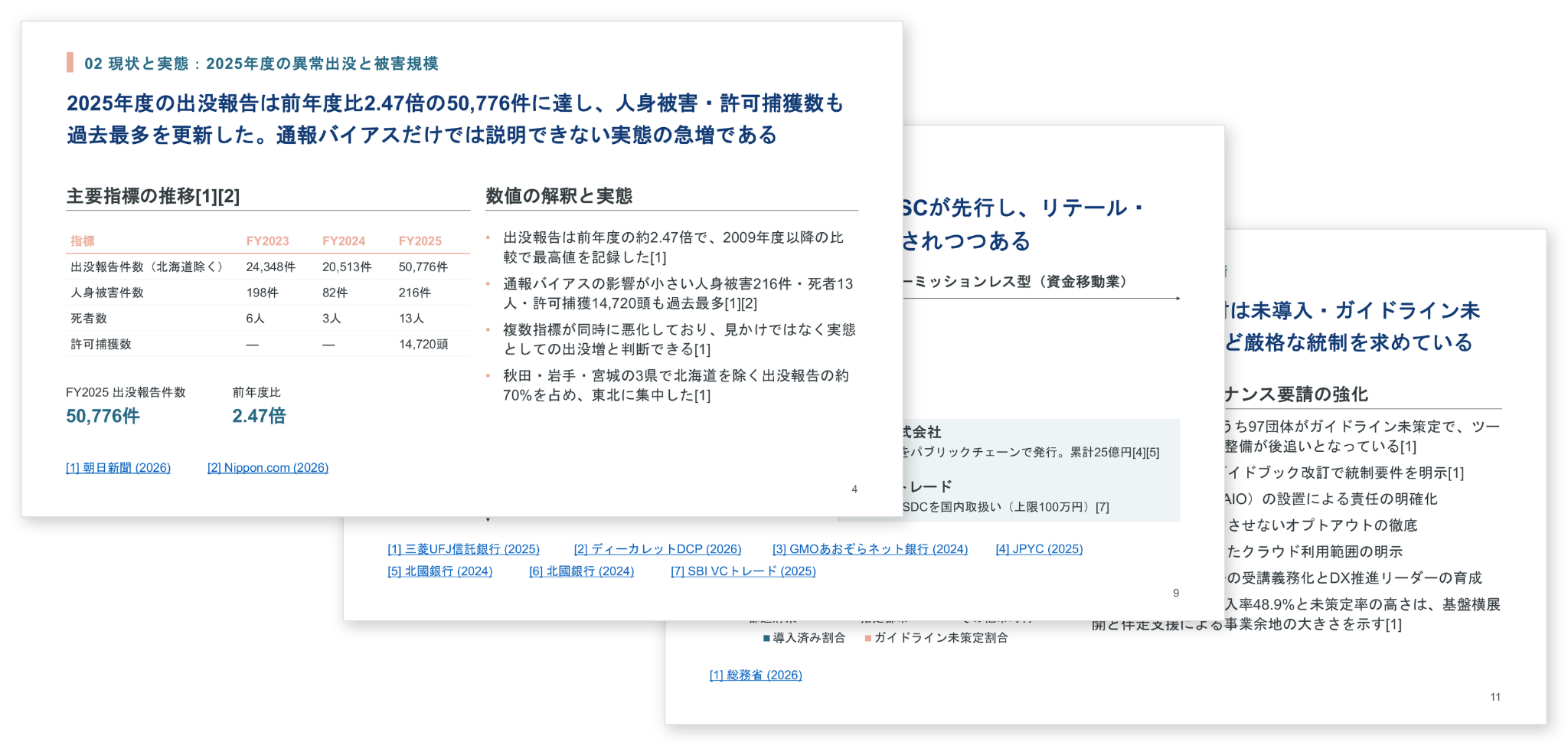
リリース当時の出力例:詳細レポート(上)/サマリースライド(下)Output examples at launch: detailed report (top) and summary slides (bottom).
金融機関・事業会社の経営戦略/事業企画部門、コンサルティングファーム、シンクタンク、調査会社など、日常的にリサーチに取り組む幅広い職種の方にご活用いただけます。Sakana Marlin is built for the wide range of professionals who work with research every day—corporate strategy and business-planning teams at financial institutions and operating companies, consulting firms, think tanks, and research houses.
開発の背景:研究と実装の統合The Background: Bringing Research and Deployment Together
Sakana Marlinは、Sakana AIがこれまで蓄積してきた研究知見と実装経験を統合して開発したプロダクトです。Sakana Marlin brings together the research insight and the deployment experience that Sakana AI has accumulated over the years.
研究領域では、科学的発見のプロセスを自動化する「AI Scientist」、複数のモデルを協調させて推論能力を高める「AB-MCTS」、アルゴリズムエンジニアリングを自動化する「ALE-Agent」などを発表してきました。同時に、国内の各産業へのAIエージェント実装をはじめとする実務適用を通じて、高度なワークフローをエージェントが自律的に実行する仕組みの構築を進めてきました。これらの長期推論・複数モデルの最適制御技術が、Sakana Marlinに結実しました。技術的な詳細はベータリリース時のブログでご覧いただけます。On the research side, we have published work such as The AI Scientist, which automates the process of scientific discovery; AB-MCTS, which coordinates multiple models to strengthen their reasoning; and ALE-Agent, which automates algorithm engineering. In parallel, through real-world deployment—including implementing AI agents across a range of industries in Japan—we have been building the machinery for agents to execute sophisticated workflows on their own. These technologies for long-horizon reasoning and the optimal control of multiple models are what came together in Sakana Marlin. Technical details are available in our beta-release blog post.
約300名のβテスターとの協働Working With Around 300 Beta Testers
Sakana Marlinは、2026年4月より実施したクローズドβテストを経て、実務での利用に耐える品質へと磨き込まれました。金融機関・事業会社・コンサルティングファーム・シンクタンクなど多様な業界のプロフェッショナル約300名にご参加いただき、戦略立案・市場調査・リスク分析・競合分析といった実際の業務で活用いただきました。Sakana Marlin was refined to a level fit for real-world use through a closed beta that began in April 2026. Around 300 professionals from a range of industries—financial institutions, operating companies, consulting firms, and think tanks—took part, putting Sakana Marlin to work on real tasks such as strategy formulation, market research, risk analysis, and competitive analysis.
「既存のチャット型リサーチと比べて情報の深掘りの実用性が高い」という評価を多数いただく一方、出力フォーマットやレポート構成についての具体的なご要望も寄せられました。正式リリースにあたっては、こうした知見をもとにリサーチ品質・出力フォーマット・長時間タスクの安定性を強化しています。Many told us that Sakana Marlin was more practical at digging deeply into information than the chat-based research tools they had used before, while also sharing specific requests around output formats and report structure. For the official release, we have drawn on this feedback to strengthen research quality, output formatting, and the stability of long-running tasks.